Unlocking the Potential of Your Watercolor Girl Clipart Bundle for Professional Designs
There is a distinct charm in hand-painted illustrations that digital vectors often struggle to replicate. The soft edges, the subtle blending of hues, and the organic texture bring a warmth to design projects that resonates deeply with audiences. This is precisely why a Watercolor Girl Clipart Bundle has become such a valuable asset for creators ranging from Etsy shop owners to nursery decorators. However, possessing high-quality assets is only half the battle; knowing how to select, implement, and maximize these resources without falling into common traps is what separates amateur outputs from professional-grade results.
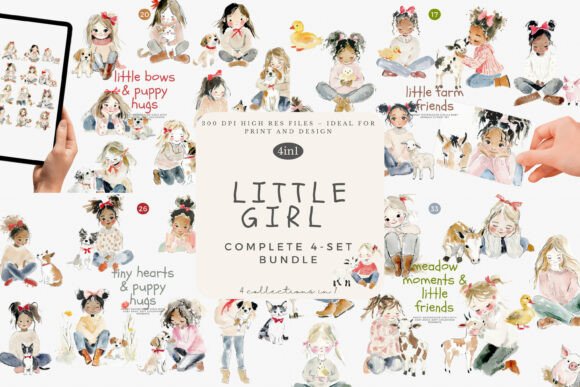
This specific collection stands out because it offers four coordinated sets featuring sweet girls interacting with animals, puppies, and farm friends. With 96 individual illustrations at a high resolution of 300dpi, the potential applications are vast. Yet, many users overlook critical details regarding file management, scaling, and licensing, which can inadvertently limit the quality of their final products or lead to unnecessary frustration. Let's explore how to navigate these pitfalls and ensure your projects shine.
Avoiding the Resolution Trap in Print Projects
One of the most frequent misunderstandings involves screen resolution versus print resolution. When you download a bundle containing files sized approximately 3096 x 2846 pixels, it is tempting to assume they will work for any project size. While these dimensions are generous for digital use, such as social media graphics or website headers, print demands a stricter standard. The industry standard for crisp printing is 300 dots per inch (dpi). Fortunately, this bundle meets that requirement, but users often make the mistake of stretching these images beyond their intended limits.
If you attempt to print a 10x9.5-inch image on a large canvas meant for a wall mural without checking the effective dpi, the result can be pixelation or blurriness. The watercolor texture, which relies on fine gradients, suffers significantly when upscaled improperly. To avoid this, always calculate your intended print size before starting. If you need a larger format, consider using the individual elements to create a new composition rather than stretching a single file. For small business owners creating stickers or planners, the provided size is perfect, but for large-scale nursery wall art, you may need to arrange multiple elements to fill the space while maintaining clarity.
The Peril of Ignoring File Organization
Receiving 96 high-resolution PNG files can feel overwhelming if you do not have a system in place immediately upon download. A common error among beginners is dumping all files into a single folder and relying on memory to find specific images later. This approach kills efficiency, especially when you are on a deadline for a baby shower invitation or a client project. Time spent scrolling through hundreds of thumbnails is time lost on actual design work.
A better approach is to leverage the coordinated nature of the collection. Since this bundle includes four distinct sets, create four corresponding folders on your drive immediately. Label them clearly, perhaps by theme (e.g., "Farm Friends," "Puppies," "Sweet Girls"). Within those folders, you might further organize by color palette or specific animal type if the volume warrants it. Some designers even create a visual contact sheet—a single PDF or image file displaying thumbnails of every illustration with their filenames underneath. This allows you to browse your assets quickly without opening individual files, streamlining your workflow significantly.
Misunderstanding Transparency and Backgrounds
While PNG files are known for supporting transparency, not all software handles them identically, and not all users know how to verify it. A frustrating mistake occurs when a designer places a clipart image onto a colored background, only to discover a white halo or box surrounding the illustration. This usually happens if the file was accidentally saved as a JPG during an intermediate editing step, or if the software being used does not support alpha channels.
Before integrating these watercolor girls into your cards or planners, perform a quick quality check. Open a few random files in your design software and place them over a dark or vibrant background. Ensure the edges are clean and that no white artifacts remain. Because watercolor illustrations often have soft, feathered edges, a white halo can look particularly unnatural and unprofessional. If you encounter this, return to the original source file. Additionally, when layering these images, remember that watercolor textures can sometimes appear semi-transparent. If you need solid opacity for cutting machines or specific print methods, you may need to adjust the opacity settings or add a subtle backing layer to ensure the colors pop as intended.
Licensing and Commercial Use Clarity
For entrepreneurs and small business owners, the most critical aspect of any digital purchase is the license agreement. A dangerous assumption is that buying a clipart bundle automatically grants unlimited commercial rights. While many bundles, including high-quality ones like this, do allow for commercial use in physical products like prints and stickers, there are often restrictions on how the files themselves can be distributed.
For instance, you generally cannot resell the digital files as they are, nor can you include them in a digital template where the end-user can extract the original artwork. Misinterpreting these terms can lead to copyright strikes or account suspensions on marketplaces. Always read the specific license included with your download. If you plan to use these illustrations for a product where the digital file is the primary value (such as a digital planner), double-check that this is permitted. When in doubt, reaching out to the creator for clarification is a small step that protects your business reputation and longevity.
Maximizing Versatility Through Composition
Finally, a missed opportunity often lies in treating each clipart piece as a standalone entity. While the individual illustrations of girls with animals are charming on their own, the true power of a coordinated bundle lies in mixing and matching. Users sometimes fail to realize that they can deconstruct scenes or combine elements from different sets within the bundle to create unique narratives.
Consider a scenario where you are designing a birthday card. Instead of using a pre-made scene, you might take a girl from one set and pair her with a puppy from another to create a custom interaction that fits your specific message. This level of customization adds value to your work and ensures your designs stand out from others who might be using the same assets in a predictable manner. Experiment with scaling different elements relative to each other to create depth, or rotate items slightly to fit unusual layout spaces in planners or journals.
By paying attention to resolution limits, organizing your library effectively, verifying transparency, respecting licensing terms, and creatively composing your scenes, you transform a simple download into a powerful toolkit. The Watercolor Girl Clipart Bundle offers a delightful foundation with its soft nursery aesthetics and gentle baby animal illustrations, but it is your informed usage that turns these pixels into professional success. Take the time to understand the tools you are using, and your projects will reflect the care and quality that your audience expects.